
Manage your WhatsApp campaigns in one place
Send personalised announcements to customers who agreed to hear from you, schedule messages and answer common questions automatically. See who received and who replied on one screen.
 Watzle · New bulk message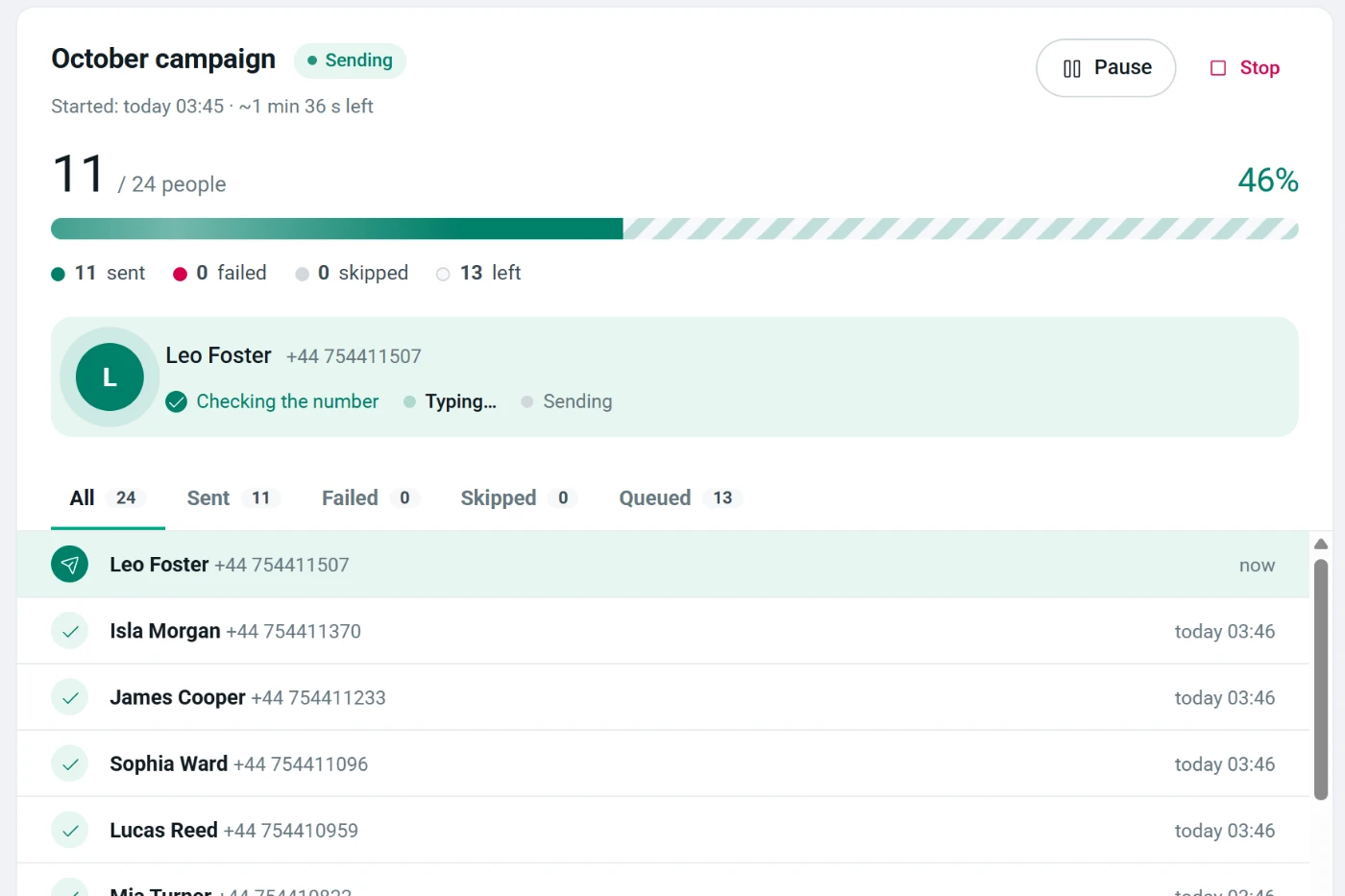
Everything you need for customer messages
Works right next to WhatsApp Web. No extra phone, server or API key needed.
Use your customer list
Upload your customer list as Excel or CSV, or paste numbers. Save lists and reuse them for every announcement.
A message for each person
Personalise with fields like name, city or order number; attach images, videos and PDFs. Preview what each person will see before sending.
A/B testing PRO
Try up to five versions of a message; the one with the most replies goes to everyone else automatically.
Scheduling and repeats
Set a message for a later date, or repeat it every day, week or month. It goes out by itself while your computer is on.
Who received, who replied
Delivered, read and replied for every person. See why a message did not go, and export the report to Excel.
Auto-replies
Answer words like “price”, “address” or “opening hours” with a ready reply, so customers never wait, even after hours.
Number check
Filter out numbers that are not on WhatsApp before you send, so no message is wasted.
Saved messages and lists
Save the messages you send often and your contact lists, and reuse them in every campaign.
Opt-out list
People who reply “STOP” are added to the opt-out list automatically and never get another message.
Your first campaign in three steps
Setup takes a minute. No technical knowledge needed.
Install and sign in with Google
Add Watzle to Chrome and sign in with your Google account. No password to create; you start on the free plan right away.
Add contacts, write the message
Upload your list and personalise the message with fields. Check what each person will see in the phone preview.
Send and follow up
With WhatsApp Web open, Watzle sends the messages one by one at a measured pace. Watch progress and replies live.
Respectful to your recipients, by design
Watzle is built for talking to people who gave you permission. It makes opting out easy, limits sending speed and hours, and warns you about bad habits.
- Easy opt-out. Anyone who replies “STOP” joins the opt-out list and never gets another message.
- Measured pace. Waits between messages and regular breaks; your recipients never get hundreds of messages at once.
- Limits for new numbers. On a new number the daily volume grows gradually.
- Sending hours and daily cap. No messages at midnight; you set the daily maximum.
- Feedback tracking. Watches delivery and reply rates; if messages stop landing, sending pauses and you are warned.
Sending health
GoodWatzle is made only for messaging people who agreed to hear from you. Unsolicited bulk messaging (spam) is against our terms.
Your contacts and messages stay with you
Watzle runs in your browser. Your customer list never reaches our servers.
Everything on your computer
Contact lists, messages, reports and chat backups are stored only in this browser.
Only your account on our server
Your Google email, name, plan and daily message count. Numbers, not content.
Secure payments
Payments are handled by Paddle; your card details never reach us. Invoices and tax are handled by Paddle.
Start free, go Pro when you grow
One paid plan with everything unlimited. Cancel anytime.
Free
No card needed.
- 100 messages a day
- 50 number checks a day
- 3 attachments per send (image, video, PDF)
- 10 saved messages, 3 contact lists
- 1 scheduled send, 1 auto-reply rule
- Last 30 reports, export up to 500 rows
- Measured pace, sending hours and STOP opt-out
Pro
$6.58 a month, billed once a year.
- Unlimited messages and number checks
- A/B testing: 5 variants, automatic winner
- Unlimited scheduled and repeating sends
- Unlimited auto-reply rules
- Unlimited attachments, saved messages and lists
- All reports, full Excel / CSV / vCard export
- Unlimited devices
Prices are in US dollars; VAT or sales tax may be added at checkout depending on your country. Purchases are made inside the extension. Cancel anytime; Pro stays on until the end of the period you paid for. Details: Cancellation policy.
Questions you may have
How does Watzle work, what do I need?
Watzle is a Google Chrome extension (it also works in Edge and other Chromium browsers). Once you sign in to WhatsApp Web with your phone, it sends messages from your own account. No extra phone, server or WhatsApp Business API account is needed.
Do I need a WhatsApp Business account?
No. It works with both WhatsApp and the WhatsApp Business app. For businesses, the Business app looks more trustworthy to customers.
How do I stay within WhatsApp’s rules?
Only message people who know you and agreed to receive messages; never use bought or scraped lists. Give an opt-out in every message (Watzle blocks people who reply “STOP” automatically) and follow WhatsApp’s Business Policy. WhatsApp may restrict accounts that receive many complaints; that decision is WhatsApp’s.
Where are my contacts and messages stored?
Only on your computer, inside the browser. Our server keeps only your account (Google email and name), your plan and your daily message count. Details in the Privacy policy.
Do scheduled messages go out when my computer is off?
No. Watzle runs in your browser, so at the scheduled time the computer must be on, with Chrome and your WhatsApp Web session open. If a send is missed, Watzle lets you know.
Does the free plan expire?
No. The free plan has no end date; 100 messages and 50 number checks a day, renewed every night.
How do I cancel Pro?
In the extension, go to Subscription › “Manage subscription” and cancel in one click. You are not charged for the next period and Pro stays on until the end of the period you paid for; then your account moves to the free plan. Unused time is not refunded; see the Cancellation policy.
Can I get an invoice?
Yes. Payments are handled by our reseller Paddle; an invoice reaches your email after each payment. You can add company details at checkout or in “Manage subscription”.
Who do I contact if something goes wrong?
Use the “Contact us” button in the extension; our answer appears inside the extension and you get a notification. You can also email [email protected].
Send your first campaign today
Setup takes a minute. No card needed, 100 messages a day free.